
At its heart, text annotation software is what we use to teach computers our language. It's a tool that lets a person take raw, jumbled text and add structured labels or tags, turning it into the high-quality training data that AI and machine learning models need to learn.
From Raw Text to AI Fuel: How Annotation Software Works

Think about teaching an AI to understand customer reviews. Without any help, it would just see a jumble of words: "love," "broken," "slow," "amazing." It wouldn't have a clue about the actual sentiment or what the customer was trying to say. Text annotation software is what adds that crucial layer of human context.
You can almost picture it as a super-organized librarian for your data. Instead of a chaotic pile of books, the software helps you methodically label each piece of text. This process turns that messy, unstructured text into perfectly organized fuel for powerful Natural Language Processing (NLP) models.
The Foundation of Modern Language AI
What text annotation really does is create a "ground truth" for your AI model to learn from. This labeled data becomes the textbook the AI studies. By feeding it thousands—or even millions—of examples of correctly labeled text, you're teaching it how to make smart predictions on brand new data it's never seen before.
This isn't just a technical step; it's a strategic one. It's how you unlock the real value hidden inside all your text data. If the annotations are low-quality, the AI model will be, too, which means inaccurate results and frustrated users. The quality of your training data directly shapes the quality of your AI. You can learn more about this core concept in our guide to data annotation.
The process of text annotation is what enables a simple chatbot to evolve into an intelligent virtual assistant, or a basic spam filter to become a sophisticated security shield. It’s the human-guided effort that gives machine learning its intelligence.
Powering Everyday Technology
The results of good text annotation are all around us, usually working so well we don't even notice them. Anytime you use a smart device or a service that seems to just get what you're saying, you can bet high-quality annotated data was part of its training.
- Customer Service Chatbots: These bots rely on annotated data to figure out a user's intent. That's how they know to route questions about "billing issues" differently than "product returns."
- Spam Filters: Your email provider trains its filters on huge datasets where every message has been labeled "spam" or "not spam." This is how it learns to keep your inbox clean.
- Sentiment Analysis: Brands use models trained on text labeled as "positive," "negative," or "neutral" to comb through social media and understand how people feel about their products.
The importance of this technology is clear. The global data annotation tool market, where text annotation software is a huge piece of the puzzle, is expected to explode from USD 1.69 billion in 2025 to USD 14.26 billion by 2034. This massive growth just underscores how vital this work is for building the next generation of AI.
The Core Methods of Text Annotation Explained

Text annotation isn’t a single technique. It’s more like a specialist's toolkit, filled with different instruments for different jobs. You wouldn't use a sledgehammer to fix a watch, and you wouldn't use the wrong annotation method to teach your AI what it needs to know.
Choosing the right approach means matching the right tool to your specific goal. Forget the dense academic jargon for a moment; these methods are practical solutions to real business problems. Getting a feel for the "what" and "why" of each one is the first step to building an AI model that actually works.
Pinpointing Key Information With Entity Annotation
Often, the first thing you need AI to do is simply find and label important bits of information scattered across thousands of documents. That’s the job of entity annotation. It’s all about training a model to locate and tag specific "entities"—think names, dates, addresses, product SKUs, or anything else that matters to your business.
The most common flavor of this is Named Entity Recognition (NER). Picture a law firm drowning in contracts. They need to find every company name, effective date, and monetary figure buried in the text. NER automates that, turning a painful, manual search into a fast, accurate process. It's like giving your software a set of digital highlighters and a very specific set of instructions on what to mark up.
Another powerful technique is Keyphrase Tagging, which focuses on identifying the core topics or concepts in a document. A market research team could use this to sift through thousands of customer reviews, automatically pulling out the main themes to see what people are really talking about.
Categorizing And Sorting Text At Scale
Sometimes you don't care about specific words; you need to know what the whole piece of text is about. That's where text classification shines. This method involves assigning a predefined tag or category to an entire document, paragraph, or even a single sentence.
It’s the quiet hero behind many of the automated systems we rely on every day. Think about a customer support inbox getting hammered with emails. Text classification can be a game-changer, automatically sorting messages into the right buckets:
- Urgent Technical Issue: Flagged and sent straight to the engineering team.
- Billing Question: Routed directly to the finance department.
- Positive Feedback: Forwarded to marketing to share as a testimonial.
- Feature Request: Logged for the product team to consider.
This simple act of sorting saves countless hours and makes sure customers get the right help, fast. It transforms a chaotic flood of communication into a streamlined, actionable workflow.
Understanding The Emotion And Intent Behind Words
It’s not always enough to know what someone is saying; you often need to know how they’re saying it. This is where sentiment analysis comes in. Also known as sentiment annotation, this process involves labeling text based on its emotional tone—is it positive, negative, or neutral?
This is incredibly powerful for keeping a finger on the pulse of public opinion. A brand can use sentiment analysis to monitor social media in real-time, catching a wave of negative comments about a service outage before it becomes a crisis. On the flip side, they can amplify positive shoutouts from happy customers.
Sentiment analysis goes way beyond simple keyword tracking. It delivers a nuanced read on customer emotion, allowing businesses to measure brand health, see if a campaign is landing well, and pinpoint areas for improvement with stunning clarity.
Of course, human language is messy. A phrase like "That new feature is sick!" could be a huge compliment or a scathing complaint, depending on the context. This is exactly why high-quality annotation is so critical. It teaches the model to understand the sarcasm, slang, and subtle cues that a basic keyword search would completely miss. The precision of your text annotation software is what enables your model to make these calls correctly, giving you a true picture of how your customers really feel.
To help tie all this together, here’s a quick look at how these core annotation methods translate directly into business value.
Key Text Annotation Methods and Their Business Impact
| Annotation Method | Core Function | Real-World Business Application |
|---|---|---|
| Named Entity Recognition (NER) | Finds & labels specific data points (names, dates, locations) | Automating data extraction from legal contracts or financial reports. |
| Keyphrase Tagging | Identifies the main topics or concepts in a block of text | Summarizing customer reviews to find recurring themes and complaints. |
| Text Classification | Assigns a category to an entire piece of text | Automatically sorting and routing incoming customer support tickets. |
| Sentiment Analysis | Determines the emotional tone (positive, negative, neutral) | Monitoring brand mentions on social media to gauge public opinion. |
Each of these methods provides a different lens through which an AI can learn to understand language, turning unstructured text into a valuable, actionable asset for your business.
What to Look For: Core Features of Modern Annotation Software
When you're picking a text annotation tool, you're not just checking off items on a feature list. You're choosing the engine that will power your entire data pipeline. A great platform is built on three pillars: it has to make teamwork easy, it has to have quality control baked in, and it needs to play nice with the other tools you're already using.
Think of it like this: you could try to build a house with basic hand tools, but a professional crew comes with power tools that make the job faster, more precise, and safer. The right annotation software gives your team those power tools, preventing the costly mistakes and slowdowns that can derail an AI project.
Making Teamwork Actually Work
The minute you have more than one person annotating, consistency becomes your biggest hurdle. If one person tags "Apple" as a company and another tags it as a fruit, your dataset's integrity is compromised. This is why collaboration features aren't just a nice-to-have; they're absolutely essential for creating data that an AI model can actually learn from.
Any serious annotation software needs to provide:
- A Central Project Hub: You need a single dashboard where managers can see everything at a glance—who’s working on what, how much is done, and where the bottlenecks are. No more juggling spreadsheets.
- Built-in Guidelines: Instructions, rules, and examples should live right inside the tool. Forcing annotators to constantly switch between a PDF and their annotation screen is a recipe for errors and frustration.
- Clear Roles and Permissions: Everyone on the team has a different job. The software should let you set up specific roles—like annotator, reviewer, and project manager—so people only see and do what they’re supposed to.
These features are what turn a collection of individual annotators into a high-functioning team, all reading from the same sheet of music.
Weaving Quality Control into the Fabric of Your Workflow
Bad data is the silent killer of AI projects. The old saying "garbage in, garbage out" has never been more true. That's why modern tools don't treat quality assurance (QA) as an afterthought; they build it directly into the annotation process. Relying on manual spot-checks after the fact is just too slow and unreliable.
Look for software that makes quality the path of least resistance.
A truly effective annotation platform doesn't just facilitate labeling; it actively prevents errors. Built-in QA workflows are the difference between hoping for quality and engineering it from the start, saving countless hours of rework.
Here are the key QA features that matter:
- Consensus Scoring: This is a fantastic feature that automatically flags disagreements. If two people annotate the same sentence differently, the system highlights the conflict. This instantly shows you where your guidelines might be confusing or where an annotator might need more training.
- Review and Feedback Loops: A good tool lets a senior team member or reviewer approve, reject, or comment on annotations. This creates a tight feedback loop, helping annotators learn from their mistakes in real-time and improve their accuracy with every task.
- Blind Annotation: To get a truly honest look at how clear your instructions are, some platforms let multiple annotators label the same data without seeing what the others are doing. It's the ultimate test of consistency.
Ensuring Smooth Integration and Scalability
Your annotation tool can't be an island. It has to connect seamlessly with the rest of your MLOps (Machine Learning Operations) pipeline. Getting data in and out of the platform without a headache is non-negotiable if you ever want to scale your projects.
Make sure your chosen software supports:
- Flexible Data Formats: The tool should have no problem handling common formats like JSON, CSV, or CoNLL. Just as importantly, it needs to export the finished annotations in a format your machine learning models can understand.
- A Solid API: A well-documented API is your key to automation. It lets your engineers write scripts to upload new data, kick off annotation jobs, and pull down completed datasets automatically. This is how you go from labeling thousands of examples to millions. For a deeper dive, our overview of a complete data annotation platform offers more context on this.
- Enterprise-Ready Security: If you're working with customer data or anything remotely sensitive, security is paramount. Look for features like SSO (Single Sign-On), data encryption, and compliance with standards like GDPR or HIPAA. This isn't just a feature; it's a requirement for protecting your data and your users.
How to Build an Efficient Annotation Workflow
Great data quality doesn't just happen by magic—it's the result of a thoughtful, well-designed process. Putting together a solid annotation workflow is the only way to avoid the classic "garbage in, garbage out" problem that tanks so many AI projects. Without a repeatable blueprint, teams end up with inconsistent labels, expensive do-overs, and models that just don't work.
A strong workflow takes a potentially chaotic labeling task and turns it into a predictable, scalable operation. It gives you the structure you need to manage your team, keep quality high, and get AI-ready data delivered on schedule. Skipping this step is a huge gamble. In fact, a staggering 75% of AI project failures can be traced back to poor data, while models trained on properly labeled text see performance jump by 20-35%.
The image below breaks down the three core pillars of any successful workflow: Collaboration, Quality, and Integration.
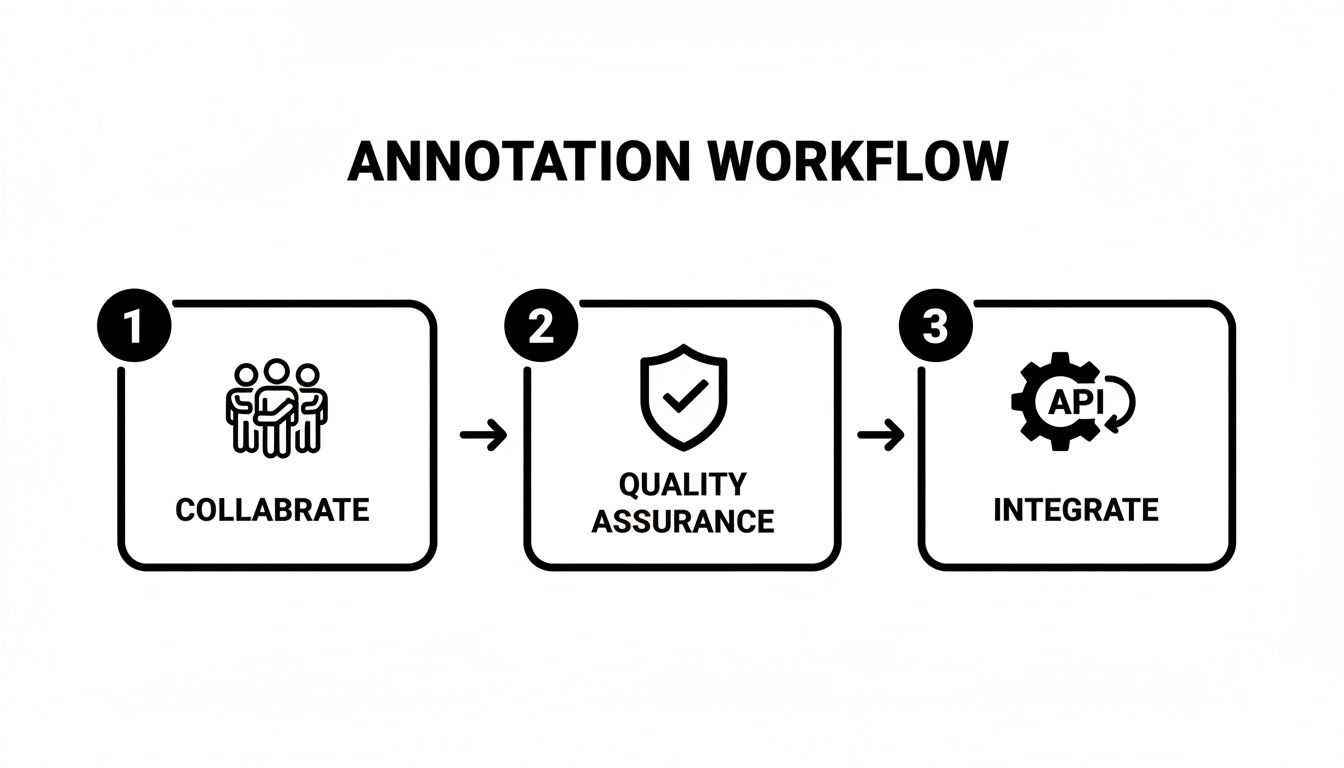
This really drives home the point that great annotation is about more than just the labeling itself. It requires a complete system that brings together your people, your processes, and your technology.
Step 1: Start with Crystal-Clear Guidelines
Think of your annotation guidelines as the constitution for your entire project. They need to be the single source of truth—detailed, unambiguous, and packed with real examples. Vague instructions are the number one cause of inconsistent labels, guaranteed.
A bulletproof set of guidelines should always include:
- Detailed Definitions: Spell out exactly what each label or entity means within the context of your project.
- "Do" and "Don't" Examples: Show annotators precisely what a correct label looks like. Just as importantly, show them what an incorrect one looks like.
- Edge Case Instructions: You have to plan for the weird stuff. What should an annotator do when they run into sarcasm, a typo, or a sentence with multiple valid interpretations? Address these tricky scenarios upfront.
Before you go all-in, always run a small pilot project on a sample of your data. This trial run is the perfect way to stress-test your guidelines, find out what's confusing, and get crucial feedback from your first batch of annotators.
Step 2: Implement a Robust Quality Feedback Loop
Quality assurance isn't something you tack on at the end; it's a continuous cycle woven directly into your workflow. The idea is to create a tight feedback loop between your annotators, reviewers, and project managers. This helps you catch errors early and keeps everyone on the same page.
The most efficient workflows are built around rapid, iterative feedback. Instead of waiting until the end to review a massive batch of data, effective teams use their text annotation software to review work in smaller increments, correcting course quickly and preventing systemic errors from spreading.
This loop often involves a multi-stage review, where a senior annotator or a QA manager checks a percentage of the work. If they spot inconsistencies, the labels get sent back to the original annotator with specific notes. This not only helps that person improve but also helps clarify the guidelines for the whole team. It’s a core principle of what makes Human-in-the-Loop machine learning so powerful.
Step 3: Choose the Right Workforce Model
The final piece of the puzzle is deciding who will actually do the labeling. Your choice will come down to a mix of factors, like your project's complexity, your budget, how sensitive the data is, and how quickly you need to scale up.
There are three main models to think about:
- In-House Teams: This approach gives you maximum control and is perfect for projects with highly sensitive or proprietary data. It's also your best bet when you need deep domain expertise. The trade-off? It can be more expensive and slower to scale.
- Crowdsourcing Platforms: Got a massive, relatively simple task? Crowdsourcing platforms offer incredible speed and scale at a lower price point. The challenge, however, is maintaining consistently high quality, and this model is definitely not a fit for complex or sensitive data.
- Managed Services: A managed service provider strikes a nice balance between scalability and quality. These partners give you access to trained and managed teams of annotators, complete with project management and QA. This frees up your internal experts to focus on what they do best: building models.
Deciding Between Software and Managed Annotation Services
Sooner or later, every AI team hits a critical fork in the road: how do we actually get this mountain of text labeled? This is the classic build-versus-buy dilemma. Do you wrangle the whole process yourself using text annotation software, or do you team up with a managed service that handles it all for you?
There's no magic answer here. The right path really depends on your team's expertise, the complexity of your data, your budget, and your project's timeline. Getting this wrong can mean missed deadlines, wasted money, and garbage-in, garbage-out data that poisons your model. It’s a decision worth getting right.
At its core, the choice boils down to a trade-off between having total control and being able to scale up quickly. Let's break down the pros and cons of each approach so you can figure out what makes sense for your project.
When to Manage Annotation In-House with Software
Going the in-house route gives you maximum control over every little detail. This isn't just about buying a software license; it means you're on the hook for finding, training, and managing the people who will be doing the actual labeling.
This approach is usually the go-to for companies in a few specific scenarios.
- You Need Deep Domain Expertise: If your data is full of jargon-heavy medical records, dense legal contracts, or technical engineering specs, your own subject matter experts are probably the only people who can label it correctly.
- Your Data is Ultra-Sensitive: When you're dealing with proprietary company secrets, personal health information (PHI), or confidential financial data, keeping everything behind your own firewall is often the only option.
- You're Still Figuring Things Out: If your annotation guidelines are a work in progress and you need to test different labeling strategies, having the team down the hall (or on the same Slack channel) makes it easy to iterate and give instant feedback.
Keeping annotation in-house is the default choice when data security and nuanced domain knowledge are paramount. It ensures your most valuable assets and the quality of your training data are never out of your direct control.
When to Partner with a Managed Annotation Service
The other option is to hand off the work to a managed service provider. These partners, like Zilo AI, give you a full-package deal: the software, a pre-trained workforce, project managers, and quality checks all bundled together. It's the fast-track option.
Working with a service is often the best move when your needs get bigger.
- Speed and Scale are Everything: Got millions of documents that needed to be labeled yesterday? A managed service can spin up a massive, ready-to-go workforce almost overnight. Building that kind of team internally would take months, if not longer.
- Your Core Team is Stretched Thin: Let's be honest, your data scientists and engineers are expensive. Outsourcing frees them from the nitty-gritty of managing annotation pipelines so they can focus on what they do best: building and refining models.
- You Need Niche Language Skills: If your project involves multiple languages or requires an understanding of specific regional dialects, a good service provider can tap into a global network of linguistic experts you couldn't find on your own.
The Hybrid Model: A Best-of-Both-Worlds Approach
Luckily, this isn't an all-or-nothing decision. A hybrid model can give you the perfect blend of control and scale.
Here's how it works: your in-house experts tackle the most difficult or sensitive data that requires their unique knowledge. Meanwhile, you outsource the high-volume, more straightforward labeling tasks to a managed service.
This strategy lets you keep a tight grip on what matters most while still tapping into the speed and efficiency of an external partner. It's a smart, flexible way to match the right people to the right job, optimizing your project for both quality and velocity.
Measuring the ROI of Your Text Annotation Efforts
Let's be honest: investing in high-quality text annotation is a big decision. It’s not just a technical task; it's a strategic move that costs time, money, and focus. To make that investment worthwhile, you have to connect the dots between your annotation work and real, tangible business results. It’s about getting past the technical jargon and proving how better data builds a stronger bottom line.
Measuring the Return on Investment (ROI) boils down to a single, critical question: "How is this making our business better?" The answer isn't found in abstract metrics, but in a clear line of sight from data quality to model performance, and from that performance to real-world business outcomes.
From Data Quality Metrics to Model Performance
The first step is figuring out just how good your annotated data is. The gold standard here is a metric called Inter-Annotator Agreement (IAA). In simple terms, IAA measures how consistently different people label the same piece of data. A high IAA score is a great sign—it means your annotation guidelines are solid and your data is reliable.
Once you have a grip on data quality, you can see how it directly impacts your AI model's performance. You’ll want to track core machine learning metrics like:
- Precision: Of all the times the model said "yes," how often was it right?
- Recall: Of all the actual "yes" cases, how many did the model catch?
- F1-Score: This is the harmonic mean of precision and recall, giving you a balanced scorecard of your model's effectiveness.
When you track these numbers, you can draw a straight line from a better IAA score to a measurable jump in your model's accuracy.
Think of it this way: Investing in better annotation is like putting premium fuel in your engine. A 5% improvement in data consistency (your IAA score) might directly cause a 10% reduction in model errors. That's where the real business value starts to unlock.
Tying Model Improvements to Business Value
This is where the rubber meets the road. A more accurate model isn't just a win for the data science team; it's a powerful business asset that can boost efficiency, delight customers, and slash costs. The trick is to translate those model improvements into the business Key Performance Indicators (KPIs) your leadership team actually cares about.
Let’s walk through a real-world example. Imagine an e-commerce company using an AI chatbot for customer support. They decide to invest in a project using text annotation software to get the bot to better understand what customers are asking for.
- The Investment: The company dedicates resources to annotate thousands of customer conversations, specifically training the chatbot to tell the difference between a "return request" and a "shipping status query."
- The Performance Gain: After being retrained on this new, high-quality data, the chatbot's ability to recognize customer intent improves by 8%.
- The Business Impact: That seemingly small 8% boost means the bot can now handle an extra 5,000 queries every month on its own, without escalating to a human agent.
- The ROI Calculation: If every support ticket handled by a human costs the company $15, this annotation project is now saving them $75,000 per month in operational costs.
Now that’s a clear, quantifiable return. The same logic holds true everywhere. A bank that improves its fraud detection model's recall by just 3% could prevent millions in losses. A media company using text classification to filter toxic comments might cut its human moderation workload by 40%.
Ultimately, measuring the ROI of text annotation demands a holistic view. It begins with a serious commitment to data quality, links that quality directly to how well your model performs, and finally, ties that performance to the business goals that really move the needle.
Common Questions About Text Annotation Software
Diving into any new technology brings up a lot of questions, and text annotation software is no exception. Let's clear up some of the most common things teams ask when they're just getting started with data labeling.
How Do I Ensure High-Quality Annotations from My Team?
Getting high-quality annotations consistently comes down to a simple formula: great instructions, the right tools, and a solid feedback loop. It all begins with your annotation guidelines. They need to be crystal clear, packed with concrete examples of what to do and—just as importantly—what not to do. The goal is to eliminate any guesswork.
Once your guidelines are set, you need software that actively helps you enforce them. Look for tools that have built-in quality control features, such as:
- Consensus Scoring: This is a lifesaver. The tool automatically flags any piece of text where annotators disagree on the label. It’s an instant red flag that points you directly to confusing parts of your instructions.
- Admin Review Workflows: A good platform lets a senior annotator or project manager easily review, approve, or reject labels. This creates a direct feedback channel to help your team learn and improve.
- Pilot Projects: Never, ever jump straight into a massive project. Always run a small pilot first to road-test your guidelines and catch any fuzzy areas before you scale up.
It's this blend of clear rules and active, ongoing review that really produces the consistent, reliable training data you need.
What Is the Difference Between Text Annotation and Text Labeling?
Honestly, in the AI world, you'll hear "text annotation" and "text labeling" used interchangeably all the time. For the most part, they refer to the same thing: adding meaningful tags or metadata to text so a machine can understand it.
If you really want to split hairs, "annotation" can sometimes imply more complex tasks, like mapping out the relationships between different words in a sentence (e.g., dependency parsing). "Labeling" often refers to simpler classification tasks, like slapping a "positive" or "negative" tag on a product review.
But for all practical purposes, when you're building an AI model, they both mean the same thing. You're adding structure to raw text so your algorithm has something to learn from.
Can I Use Free Annotation Software for a Commercial Project?
You absolutely can, but you have to go in with your eyes wide open. Free, open-source tools are fantastic for academic work, personal projects, or small proof-of-concept experiments. They're a great way to get your feet wet without a budget.
However, when you're talking about a serious commercial project, paid text annotation software usually brings a lot more to the table. You're paying for things like dedicated technical support, robust security features (think GDPR or HIPAA compliance), and project management tools built to handle large, collaborative teams. Before you build your commercial pipeline around a free tool, dig into its license and be realistic about whether it can meet your long-term needs for security, scale, and support.
Ready to scale your AI projects with high-quality, expertly managed data services? Zilo AI provides skilled teams for text, image, and voice annotation, ensuring your models are built on a foundation of excellence.